![图片[1]-一个简单的图片处理工具-家常菜学习日记](https://zzqdbk.cn/wp-content/uploads/2026/03/QQ20260327-091620-1024x544.png)
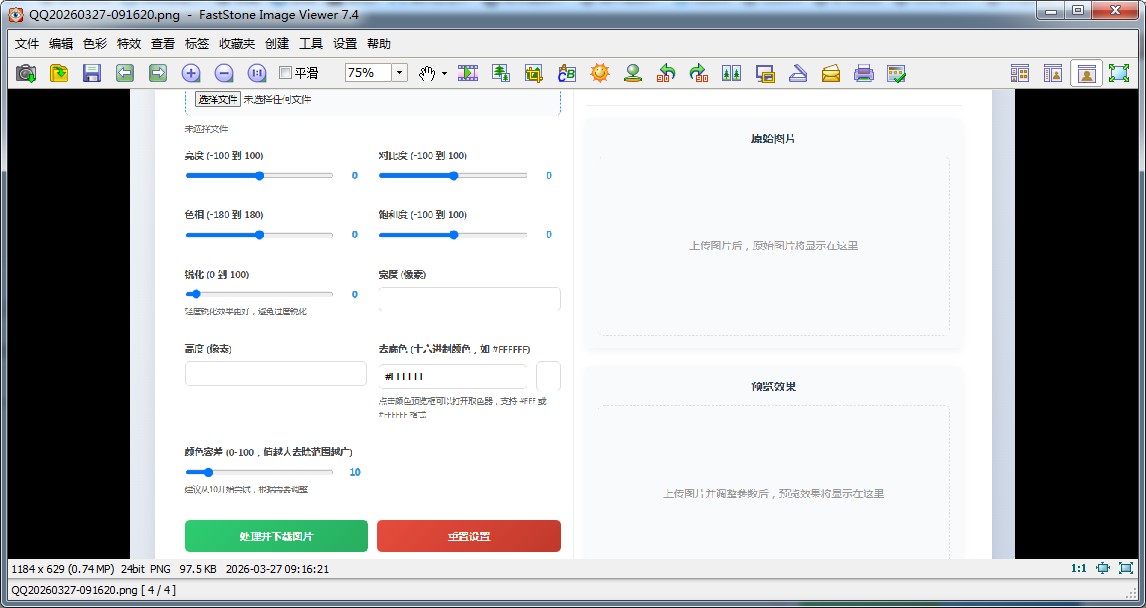
ai生成的,可以简单处理一些图片,这个工具主要是用来去底的,和能改变一些色调,可以试用一下。
<?php
/**
* PHP图片处理工具
* 新增:自动识别底色功能(基于图像边缘像素采样)
* 新增:显示原始图片分辨率
* 修复:去底色功能,修改为直接下载
* 修复:透明度设置问题(GD库中127表示完全透明,0表示完全不透明)
*/
// 启用session来跟踪用户上传的图片
session_start();
// 错误报告设置
error_reporting(E_ALL);
ini_set('display_errors', 1);
// 定义常量
define('MAX_FILE_SIZE', 10 * 1024 * 1024); // 10MB
define('ALLOWED_TYPES', ['jpg', 'jpeg', 'png', 'gif', 'webp']);
define('UPLOAD_DIR', 'uploads/');
define('OUTPUT_DIR', 'output/');
define('PREVIEW_DIR', 'previews/');
// 创建必要的目录
if (!is_dir(UPLOAD_DIR)) mkdir(UPLOAD_DIR, 0755, true);
if (!is_dir(OUTPUT_DIR)) mkdir(OUTPUT_DIR, 0755, true);
if (!is_dir(PREVIEW_DIR)) mkdir(PREVIEW_DIR, 0755, true);
// 清理旧的预览文件(超过1小时)
cleanOldFiles(PREVIEW_DIR, 3600);
cleanOldFiles(UPLOAD_DIR, 3600);
// 处理AJAX预览请求
if (isset($_SERVER['HTTP_X_REQUESTED_WITH']) && strtolower($_SERVER['HTTP_X_REQUESTED_WITH']) === 'xmlhttprequest') {
if (isset($_POST['action'])) {
switch ($_POST['action']) {
case 'preview':
handleAjaxPreview();
exit;
case 'clear_upload':
handleClearUpload();
exit;
case 'auto_detect_bg':
handleAutoDetectBg();
exit;
}
}
}
// 处理直接下载请求
if (isset($_POST['process_direct']) && isset($_SESSION['active_image_id'])) {
handleDirectDownload();
exit;
}
// 初始化session中的图片数据
if (!isset($_SESSION['uploaded_images'])) {
$_SESSION['uploaded_images'] = [];
}
// 处理表单提交
$errors = [];
$success = false;
$output_file = '';
$preview_url = '';
$original_url = '';
$original_width = 0;
$original_height = 0;
// 默认参数
$default_params = [
'brightness' => 0,
'contrast' => 0,
'saturation' => 0,
'hue' => 0,
'sharpness' => 0,
'width' => '',
'height' => '',
'remove_bg_color' => '',
'remove_bg_tolerance' => 10
];
// 获取当前参数
$params = array_merge($default_params, $_POST);
// 处理文件上传
if ($_SERVER['REQUEST_METHOD'] === 'POST') {
// 检查是否有文件上传
if (isset($_FILES['image']) && $_FILES['image']['error'] === UPLOAD_ERR_OK) {
$file = $_FILES['image'];
// 验证文件
if ($file['size'] > MAX_FILE_SIZE) {
$errors[] = "文件大小不能超过10MB";
} else {
$file_ext = strtolower(pathinfo($file['name'], PATHINFO_EXTENSION));
if (!in_array($file_ext, ALLOWED_TYPES)) {
$errors[] = "不支持的文件类型。支持的类型: " . implode(', ', ALLOWED_TYPES);
}
}
// 处理图片上传
if (empty($errors)) {
// 生成唯一文件名
$unique_id = uniqid('img_');
$input_filename = $unique_id . '.' . $file_ext;
$input_path = UPLOAD_DIR . $input_filename;
// 移动上传的文件
if (move_uploaded_file($file['tmp_name'], $input_path)) {
// 保存到session中,以便后续使用
$_SESSION['uploaded_images'][$unique_id] = [
'path' => $input_path,
'filename' => $input_filename,
'original_name' => $file['name'],
'time' => time()
];
// 设置当前活动的图片ID
$_SESSION['active_image_id'] = $unique_id;
$original_url = $input_path;
} else {
$errors[] = "文件保存失败";
}
}
}
}
// 如果有已上传的图片,显示原图并获取尺寸
if (isset($_SESSION['active_image_id'])) {
$image_id = $_SESSION['active_image_id'];
if (isset($_SESSION['uploaded_images'][$image_id])) {
$original_url = $_SESSION['uploaded_images'][$image_id]['path'];
// 获取原始图片尺寸
$size = getimagesize($original_url);
if ($size) {
$original_width = $size[0];
$original_height = $size[1];
}
}
}
/**
* 处理直接下载
*/
function handleDirectDownload() {
$image_id = $_SESSION['active_image_id'];
if (!isset($_SESSION['uploaded_images'][$image_id])) {
echo json_encode(['success' => false, 'error' => '找不到上传的图片']);
return;
}
$input_path = $_SESSION['uploaded_images'][$image_id]['path'];
$original_name = $_SESSION['uploaded_images'][$image_id]['original_name'];
// 获取参数
$params = [
'brightness' => isset($_POST['brightness']) ? (int)$_POST['brightness'] : 0,
'contrast' => isset($_POST['contrast']) ? (int)$_POST['contrast'] : 0,
'saturation' => isset($_POST['saturation']) ? (int)$_POST['saturation'] : 0,
'hue' => isset($_POST['hue']) ? (int)$_POST['hue'] : 0,
'sharpness' => isset($_POST['sharpness']) ? (int)$_POST['sharpness'] : 0,
'width' => isset($_POST['width']) ? $_POST['width'] : '',
'height' => isset($_POST['height']) ? $_POST['height'] : '',
'remove_bg_color' => isset($_POST['remove_bg_color']) ? $_POST['remove_bg_color'] : '',
'remove_bg_tolerance' => isset($_POST['remove_bg_tolerance']) ? (int)$_POST['remove_bg_tolerance'] : 10
];
// 生成临时输出文件
$temp_output = OUTPUT_DIR . 'temp_' . $image_id . '_' . time() . '.png';
// 处理图片
if (processImage($input_path, $temp_output, $params)) {
// 设置响应头,强制下载
header('Content-Type: image/png');
header('Content-Disposition: attachment; filename="processed_' . pathinfo($original_name, PATHINFO_FILENAME) . '.png"');
header('Content-Length: ' . filesize($temp_output));
// 输出文件内容
readfile($temp_output);
// 删除临时文件
unlink($temp_output);
exit;
} else {
echo json_encode(['success' => false, 'error' => '图片处理失败']);
}
}
/**
* 处理AJAX预览请求
*/
function handleAjaxPreview() {
if (!isset($_SESSION['active_image_id'])) {
echo json_encode(['success' => false, 'error' => '没有上传的图片']);
return;
}
$image_id = $_SESSION['active_image_id'];
if (!isset($_SESSION['uploaded_images'][$image_id])) {
echo json_encode(['success' => false, 'error' => '找不到上传的图片']);
return;
}
$input_path = $_SESSION['uploaded_images'][$image_id]['path'];
// 获取参数
$params = [
'brightness' => isset($_POST['brightness']) ? (int)$_POST['brightness'] : 0,
'contrast' => isset($_POST['contrast']) ? (int)$_POST['contrast'] : 0,
'saturation' => isset($_POST['saturation']) ? (int)$_POST['saturation'] : 0,
'hue' => isset($_POST['hue']) ? (int)$_POST['hue'] : 0,
'sharpness' => isset($_POST['sharpness']) ? (int)$_POST['sharpness'] : 0,
'width' => isset($_POST['width']) ? $_POST['width'] : '',
'height' => isset($_POST['height']) ? $_POST['height'] : '',
'remove_bg_color' => isset($_POST['remove_bg_color']) ? $_POST['remove_bg_color'] : '',
'remove_bg_tolerance' => isset($_POST['remove_bg_tolerance']) ? (int)$_POST['remove_bg_tolerance'] : 10
];
// 生成预览文件名(基于参数哈希)
$params_hash = md5(serialize($params));
$preview_filename = 'preview_' . $image_id . '_' . $params_hash . '.png';
$preview_path = PREVIEW_DIR . $preview_filename;
// 如果预览文件已存在且未过期(5分钟内),直接返回
if (file_exists($preview_path) && (time() - filemtime($preview_path) < 300)) {
// 获取预览图尺寸
$preview_size = getimagesize($preview_path);
echo json_encode([
'success' => true,
'preview_url' => $preview_path . '?t=' . time(),
'file_size' => formatFileSize(filesize($preview_path)),
'width' => $preview_size ? $preview_size[0] : 0,
'height' => $preview_size ? $preview_size[1] : 0
]);
return;
}
// 生成新预览
if (processImage($input_path, $preview_path, $params)) {
$preview_size = getimagesize($preview_path);
echo json_encode([
'success' => true,
'preview_url' => $preview_path . '?t=' . time(),
'file_size' => formatFileSize(filesize($preview_path)),
'width' => $preview_size ? $preview_size[0] : 0,
'height' => $preview_size ? $preview_size[1] : 0
]);
} else {
echo json_encode(['success' => false, 'error' => '预览生成失败']);
}
}
/**
* 处理清除上传请求
*/
function handleClearUpload() {
if (isset($_SESSION['active_image_id'])) {
$image_id = $_SESSION['active_image_id'];
if (isset($_SESSION['uploaded_images'][$image_id])) {
// 删除上传的文件
$file_path = $_SESSION['uploaded_images'][$image_id]['path'];
if (file_exists($file_path)) {
@unlink($file_path);
}
// 从session中移除
unset($_SESSION['uploaded_images'][$image_id]);
unset($_SESSION['active_image_id']);
}
}
echo json_encode(['success' => true]);
}
/**
* 新增:处理自动识别底色请求
*/
function handleAutoDetectBg() {
if (!isset($_SESSION['active_image_id'])) {
echo json_encode(['success' => false, 'error' => '没有上传的图片']);
return;
}
$image_id = $_SESSION['active_image_id'];
if (!isset($_SESSION['uploaded_images'][$image_id])) {
echo json_encode(['success' => false, 'error' => '找不到上传的图片']);
return;
}
$input_path = $_SESSION['uploaded_images'][$image_id]['path'];
$bg_color = detectBackgroundColor($input_path);
if ($bg_color) {
echo json_encode(['success' => true, 'color' => $bg_color]);
} else {
echo json_encode(['success' => false, 'error' => '无法自动识别背景色']);
}
}
/**
* 新增:自动识别背景色(基于图像边缘像素采样)
* @param string $image_path 图片路径
* @return string 十六进制颜色值(如 #FFFFFF),失败返回 #FFFFFF
*/
function detectBackgroundColor($image_path) {
// 加载图片资源
$image_info = getimagesize($image_path);
if (!$image_info) return '#FFFFFF';
switch ($image_info[2]) {
case IMAGETYPE_JPEG:
$image = imagecreatefromjpeg($image_path);
break;
case IMAGETYPE_PNG:
$image = imagecreatefrompng($image_path);
break;
case IMAGETYPE_GIF:
$image = imagecreatefromgif($image_path);
break;
case IMAGETYPE_WEBP:
$image = imagecreatefromwebp($image_path);
break;
default:
return '#FFFFFF';
}
if (!$image) return '#FFFFFF';
$width = imagesx($image);
$height = imagesy($image);
// 采样参数:限制总采样点数不超过2500
$max_samples = 2500;
$total_edge_pixels = 2 * ($width + $height);
$step = max(1, ceil($total_edge_pixels / $max_samples));
$r_total = 0;
$g_total = 0;
$b_total = 0;
$count = 0;
// 辅助函数:获取像素颜色(忽略透明度过高的像素)
$getPixelColor = function($x, $y) use ($image) {
$color = imagecolorat($image, $x, $y);
$rgba = imagecolorsforindex($image, $color);
// 对于有透明通道的图片,只取不透明度较高的像素(alpha值较小)
if (isset($rgba['alpha']) && $rgba['alpha'] > 60) {
return null; // 透明像素忽略
}
return ['r' => $rgba['red'], 'g' => $rgba['green'], 'b' => $rgba['blue']];
};
// 上边缘 (y = 0)
for ($x = 0; $x < $width; $x += $step) {
$pixel = $getPixelColor($x, 0);
if ($pixel) {
$r_total += $pixel['r'];
$g_total += $pixel['g'];
$b_total += $pixel['b'];
$count++;
}
}
// 下边缘 (y = height-1)
for ($x = 0; $x < $width; $x += $step) {
$pixel = $getPixelColor($x, $height-1);
if ($pixel) {
$r_total += $pixel['r'];
$g_total += $pixel['g'];
$b_total += $pixel['b'];
$count++;
}
}
// 左边缘 (x = 0),避免重复顶点(y从1到height-2)
for ($y = 1; $y < $height-1; $y += $step) {
$pixel = $getPixelColor(0, $y);
if ($pixel) {
$r_total += $pixel['r'];
$g_total += $pixel['g'];
$b_total += $pixel['b'];
$count++;
}
}
// 右边缘 (x = width-1)
for ($y = 1; $y < $height-1; $y += $step) {
$pixel = $getPixelColor($width-1, $y);
if ($pixel) {
$r_total += $pixel['r'];
$g_total += $pixel['g'];
$b_total += $pixel['b'];
$count++;
}
}
imagedestroy($image);
// 如果没有采样到有效像素,返回默认白色
if ($count == 0) {
return '#FFFFFF';
}
// 计算平均RGB
$r_avg = round($r_total / $count);
$g_avg = round($g_total / $count);
$b_avg = round($b_total / $count);
// 转换为十六进制
return sprintf('#%02X%02X%02X', $r_avg, $g_avg, $b_avg);
}
/**
* 清理旧文件
*/
function cleanOldFiles($dir, $max_age_seconds) {
$files = glob($dir . '*');
$now = time();
foreach ($files as $file) {
if (is_file($file) && ($now - filemtime($file) > $max_age_seconds)) {
@unlink($file);
}
}
}
/**
* 处理图片的主要函数
*/
function processImage($input_path, $output_path, $params) {
// 获取图片信息
$image_info = getimagesize($input_path);
if (!$image_info) return false;
// 根据类型创建图片资源
switch ($image_info[2]) {
case IMAGETYPE_JPEG:
$image = imagecreatefromjpeg($input_path);
break;
case IMAGETYPE_PNG:
$image = imagecreatefrompng($input_path);
break;
case IMAGETYPE_GIF:
$image = imagecreatefromgif($input_path);
break;
case IMAGETYPE_WEBP:
$image = imagecreatefromwebp($input_path);
break;
default:
return false;
}
if (!$image) return false;
// 先应用分辨率调整(如果指定了)
if (!empty($params['width']) || !empty($params['height'])) {
$image = resizeImage($image, (int)$params['width'], (int)$params['height']);
}
// 应用去底色(如果有需要)
if (!empty($params['remove_bg_color'])) {
$image = removeBackground($image, $params['remove_bg_color'], (int)$params['remove_bg_tolerance']);
}
// 应用亮度调整
if ($params['brightness'] != 0) {
$image = adjustBrightness($image, (int)$params['brightness']);
}
// 应用对比度调整
if ($params['contrast'] != 0) {
$image = adjustContrast($image, (int)$params['contrast']);
}
// 应用饱和度和色相调整
if ($params['saturation'] != 0 || $params['hue'] != 0) {
$image = adjustHueSaturation($image, (int)$params['hue'], (int)$params['saturation']);
}
// 应用锐化(如果有需要)
if ($params['sharpness'] != 0) {
$image = applySharpen($image, (int)$params['sharpness']);
}
// 保存为PNG
$result = imagepng($image, $output_path, 9);
// 释放内存
imagedestroy($image);
return $result;
}
/**
* 调整亮度
*/
function adjustBrightness($image, $level) {
$width = imagesx($image);
$height = imagesy($image);
$new_image = imagecreatetruecolor($width, $height);
imagealphablending($new_image, false);
imagesavealpha($new_image, true);
for ($x = 0; $x < $width; $x++) {
for ($y = 0; $y < $height; $y++) {
$color = imagecolorat($image, $x, $y);
$rgba = imagecolorsforindex($image, $color);
// 调整亮度
$r = max(0, min(255, $rgba['red'] + $level));
$g = max(0, min(255, $rgba['green'] + $level));
$b = max(0, min(255, $rgba['blue'] + $level));
$new_color = imagecolorallocatealpha($new_image, $r, $g, $b, $rgba['alpha']);
imagesetpixel($new_image, $x, $y, $new_color);
}
}
imagedestroy($image);
return $new_image;
}
/**
* 调整对比度
*/
function adjustContrast($image, $level) {
$width = imagesx($image);
$height = imagesy($image);
$new_image = imagecreatetruecolor($width, $height);
imagealphablending($new_image, false);
imagesavealpha($new_image, true);
// 转换级别为对比度因子
$contrast = $level / 100.0;
$contrast = pow((1.0 + $contrast) / (1.0 - $contrast), 2);
for ($x = 0; $x < $width; $x++) {
for ($y = 0; $y < $height; $y++) {
$color = imagecolorat($image, $x, $y);
$rgba = imagecolorsforindex($image, $color);
// 调整对比度
$r = $rgba['red'] / 255.0;
$r = ($r - 0.5) * $contrast + 0.5;
$r = max(0, min(1, $r)) * 255;
$g = $rgba['green'] / 255.0;
$g = ($g - 0.5) * $contrast + 0.5;
$g = max(0, min(1, $g)) * 255;
$b = $rgba['blue'] / 255.0;
$b = ($b - 0.5) * $contrast + 0.5;
$b = max(0, min(1, $b)) * 255;
$new_color = imagecolorallocatealpha($new_image, (int)$r, (int)$g, (int)$b, $rgba['alpha']);
imagesetpixel($new_image, $x, $y, $new_color);
}
}
imagedestroy($image);
return $new_image;
}
/**
* 调整色相和饱和度 - 使用HSL色彩空间
*/
function adjustHueSaturation($image, $hue, $saturation, $has_transparency = false) {
if ($hue == 0 && $saturation == 0) {
return $image;
}
$width = imagesx($image);
$height = imagesy($image);
$new_image = imagecreatetruecolor($width, $height);
// 设置透明度处理
if ($has_transparency) {
imagealphablending($new_image, false);
imagesavealpha($new_image, true);
}
// 填充背景(如果是透明图像)
if ($has_transparency) {
$transparent = imagecolorallocatealpha($new_image, 0, 0, 0, 127);
imagefill($new_image, 0, 0, $transparent);
} else {
$white = imagecolorallocate($new_image, 255, 255, 255);
imagefill($new_image, 0, 0, $white);
}
// 转换色相和饱和度参数
$hue_angle = $hue; // 色相角度 -180到180
$saturation_factor = 1 + ($saturation / 100); // 饱和度因子
for ($x = 0; $x < $width; $x++) {
for ($y = 0; $y < $height; $y++) {
$color = imagecolorat($image, $x, $y);
$rgba = imagecolorsforindex($image, $color);
// 如果是完全透明像素,跳过处理
if ($has_transparency && $rgba['alpha'] == 127) {
continue;
}
// 获取RGB值(0-255)
$r = $rgba['red'];
$g = $rgba['green'];
$b = $rgba['blue'];
// 将RGB转换为HSL
$hsl = rgbToHsl($r, $g, $b);
// 调整色相
if ($hue_angle != 0) {
$hsl[0] = fmod($hsl[0] + ($hue_angle / 360.0) + 1.0, 1.0);
}
// 调整饱和度
if ($saturation != 0) {
$hsl[1] = max(0, min(1, $hsl[1] * $saturation_factor));
}
// 将HSL转换回RGB
$rgb = hslToRgb($hsl[0], $hsl[1], $hsl[2]);
// 确保值在0-255范围内
$r = max(0, min(255, $rgb[0]));
$g = max(0, min(255, $rgb[1]));
$b = max(0, min(255, $rgb[2]));
// 保持原透明度
$alpha = $rgba['alpha'];
$new_color = imagecolorallocatealpha($new_image, (int)$r, (int)$g, (int)$b, $alpha);
imagesetpixel($new_image, $x, $y, $new_color);
}
}
imagedestroy($image);
return $new_image;
}
/**
* RGB转HSL转换函数
*/
function rgbToHsl($r, $g, $b) {
$r /= 255;
$g /= 255;
$b /= 255;
$max = max($r, $g, $b);
$min = min($r, $g, $b);
$l = ($max + $min) / 2;
if ($max == $min) {
$h = $s = 0;
} else {
$d = $max - $min;
$s = $l > 0.5 ? $d / (2 - $max - $min) : $d / ($max + $min);
switch ($max) {
case $r:
$h = ($g - $b) / $d + ($g < $b ? 6 : 0);
break;
case $g:
$h = ($b - $r) / $d + 2;
break;
case $b:
$h = ($r - $g) / $d + 4;
break;
}
$h /= 6;
}
return [$h, $s, $l];
}
/**
* HSL转RGB转换函数
*/
function hslToRgb($h, $s, $l) {
if ($s == 0) {
$r = $g = $b = $l;
} else {
$q = $l < 0.5 ? $l * (1 + $s) : $l + $s - $l * $s;
$p = 2 * $l - $q;
$r = hue2rgb($p, $q, $h + 1/3);
$g = hue2rgb($p, $q, $h);
$b = hue2rgb($p, $q, $h - 1/3);
}
return [
round($r * 255),
round($g * 255),
round($b * 255)
];
}
/**
* HSL转换辅助函数
*/
function hue2rgb($p, $q, $t) {
if ($t < 0) $t += 1;
if ($t > 1) $t -= 1;
if ($t < 1/6) return $p + ($q - $p) * 6 * $t;
if ($t < 1/2) return $q;
if ($t < 2/3) return $p + ($q - $p) * (2/3 - $t) * 6;
return $p;
}
/**
* 应用锐化效果
*/
function applySharpen($image, $level) {
$amount = $level / 100.0 * 5;
$blurred = imagecreatetruecolor(imagesx($image), imagesy($image));
imagealphablending($blurred, false);
imagesavealpha($blurred, true);
imagecopy($blurred, $image, 0, 0, 0, 0, imagesx($image), imagesy($image));
for ($i = 0; $i < 3; $i++) {
imagefilter($blurred, IMG_FILTER_GAUSSIAN_BLUR);
}
$width = imagesx($image);
$height = imagesy($image);
$sharpened = imagecreatetruecolor($width, $height);
imagealphablending($sharpened, false);
imagesavealpha($sharpened, true);
for ($x = 0; $x < $width; $x++) {
for ($y = 0; $y < $height; $y++) {
$color_original = imagecolorat($image, $x, $y);
$rgba_original = imagecolorsforindex($image, $color_original);
$color_blurred = imagecolorat($blurred, $x, $y);
$rgba_blurred = imagecolorsforindex($blurred, $color_blurred);
$r = (int)($rgba_original['red'] + ($rgba_original['red'] - $rgba_blurred['red']) * $amount);
$g = (int)($rgba_original['green'] + ($rgba_original['green'] - $rgba_blurred['green']) * $amount);
$b = (int)($rgba_original['blue'] + ($rgba_original['blue'] - $rgba_blurred['blue']) * $amount);
$r = max(0, min(255, $r));
$g = max(0, min(255, $g));
$b = max(0, min(255, $b));
$new_color = imagecolorallocatealpha($sharpened, $r, $g, $b, $rgba_original['alpha']);
imagesetpixel($sharpened, $x, $y, $new_color);
}
}
imagedestroy($image);
imagedestroy($blurred);
return $sharpened;
}
/**
* 调整分辨率(等比或指定尺寸)
*/
function resizeImage($image, $new_width, $new_height) {
$width = imagesx($image);
$height = imagesy($image);
if (empty($new_width) && empty($new_height)) {
return $image;
}
if (!empty($new_width) && !empty($new_height)) {
// 同时指定宽高,直接使用
} elseif (!empty($new_width) && empty($new_height)) {
$new_height = $height;
} elseif (empty($new_width) && !empty($new_height)) {
$new_width = $width;
} else {
$new_width = $width;
$new_height = $height;
}
$new_width = max(1, $new_width);
$new_height = max(1, $new_height);
$new_image = imagecreatetruecolor($new_width, $new_height);
imagealphablending($new_image, false);
imagesavealpha($new_image, true);
imagecopyresampled(
$new_image, $image,
0, 0, 0, 0,
$new_width, $new_height,
$width, $height
);
imagedestroy($image);
return $new_image;
}
/**
* 去除底色(关键修复:GD库中alpha值127表示完全透明,0表示完全不透明)
*/
function removeBackground($image, $bg_color_hex, $tolerance) {
if (empty($bg_color_hex)) {
return $image;
}
if ($bg_color_hex[0] === '#') {
$bg_color_hex = substr($bg_color_hex, 1);
}
if (strlen($bg_color_hex) === 3) {
$bg_color_hex = $bg_color_hex[0] . $bg_color_hex[0] .
$bg_color_hex[1] . $bg_color_hex[1] .
$bg_color_hex[2] . $bg_color_hex[2];
}
if (strlen($bg_color_hex) !== 6) {
return $image;
}
$bg_r = hexdec(substr($bg_color_hex, 0, 2));
$bg_g = hexdec(substr($bg_color_hex, 2, 2));
$bg_b = hexdec(substr($bg_color_hex, 4, 2));
$width = imagesx($image);
$height = imagesy($image);
$new_image = imagecreatetruecolor($width, $height);
imagealphablending($new_image, false);
imagesavealpha($new_image, true);
$transparent = imagecolorallocatealpha($new_image, 0, 0, 0, 127);
imagefill($new_image, 0, 0, $transparent);
$max_distance = sqrt(3 * pow(255, 2));
$tolerance_distance = ($tolerance / 100) * $max_distance;
for ($x = 0; $x < $width; $x++) {
for ($y = 0; $y < $height; $y++) {
$color = imagecolorat($image, $x, $y);
$rgba = imagecolorsforindex($image, $color);
$distance = sqrt(
pow($rgba['red'] - $bg_r, 2) +
pow($rgba['green'] - $bg_g, 2) +
pow($rgba['blue'] - $bg_b, 2)
);
if ($distance <= $tolerance_distance) {
$new_color = imagecolorallocatealpha($new_image, 0, 0, 0, 127);
} else {
$alpha = $rgba['alpha'];
$new_color = imagecolorallocatealpha(
$new_image,
$rgba['red'],
$rgba['green'],
$rgba['blue'],
$alpha
);
}
imagesetpixel($new_image, $x, $y, $new_color);
}
}
imagedestroy($image);
return $new_image;
}
/**
* 格式化文件大小
*/
function formatFileSize($bytes) {
if ($bytes >= 1048576) {
return round($bytes / 1048576, 2) . ' MB';
} elseif ($bytes >= 1024) {
return round($bytes / 1024, 2) . ' KB';
} else {
return $bytes . ' bytes';
}
}
?>
<!DOCTYPE html>
<html lang="zh-CN">
<head>
<meta charset="UTF-8">
<meta name="viewport" content="width=device-width, initial-scale=1.0">
<title>PHP图片处理工具 - 支持自动去底色及分辨率显示</title>
<style>
* {
margin: 0;
padding: 0;
box-sizing: border-box;
}
body {
font-family: 'Segoe UI', Tahoma, Geneva, Verdana, sans-serif;
line-height: 1.6;
color: #333;
background: linear-gradient(135deg, #f5f7fa 0%, #c3cfe2 100%);
min-height: 100vh;
padding: 20px;
}
.container {
max-width: 1400px;
margin: 0 auto;
background-color: white;
border-radius: 15px;
box-shadow: 0 10px 30px rgba(0, 0, 0, 0.1);
overflow: hidden;
}
header {
background: linear-gradient(135deg, #6a11cb 0%, #2575fc 100%);
color: white;
padding: 30px;
text-align: center;
}
header h1 {
font-size: 2.5rem;
margin-bottom: 10px;
}
header p {
font-size: 1.1rem;
opacity: 0.9;
}
.content {
display: flex;
flex-wrap: wrap;
padding: 30px;
}
.upload-section, .controls-section {
flex: 1;
min-width: 350px;
padding: 20px;
}
.upload-section {
border-right: 1px solid #eee;
}
.section-title {
font-size: 1.5rem;
margin-bottom: 20px;
color: #2c3e50;
padding-bottom: 10px;
border-bottom: 2px solid #3498db;
}
.form-group {
margin-bottom: 20px;
}
label {
display: block;
margin-bottom: 8px;
font-weight: 600;
color: #444;
}
input[type="file"] {
width: 100%;
padding: 15px;
border: 2px dashed #3498db;
border-radius: 10px;
background-color: #f8fafc;
font-size: 1rem;
cursor: pointer;
}
input[type="range"], input[type="number"], input[type="text"] {
width: 100%;
padding: 10px;
border: 1px solid #ddd;
border-radius: 8px;
font-size: 1rem;
}
input[type="range"] {
height: 10px;
}
.range-container {
display: flex;
align-items: center;
gap: 15px;
}
.range-value {
min-width: 40px;
text-align: center;
font-weight: bold;
color: #3498db;
}
.color-picker-container {
display: flex;
align-items: center;
gap: 15px;
flex-wrap: wrap;
}
.color-preview {
width: 50px;
height: 50px;
border-radius: 8px;
border: 2px solid #ddd;
background-color: <?php echo isset($params['remove_bg_color']) ? $params['remove_bg_color'] : '#ffffff'; ?>;
cursor: pointer;
}
.btn-group {
display: flex;
gap: 15px;
margin-top: 20px;
flex-wrap: wrap;
}
button, .btn {
background: linear-gradient(135deg, #3498db 0%, #2c3e50 100%);
color: white;
border: none;
padding: 12px 20px;
font-size: 1rem;
border-radius: 8px;
cursor: pointer;
transition: all 0.3s ease;
font-weight: 600;
text-decoration: none;
text-align: center;
flex: 1;
}
button:hover, .btn:hover {
transform: translateY(-2px);
box-shadow: 0 5px 15px rgba(0, 0, 0, 0.1);
}
.btn-primary {
background: linear-gradient(135deg, #3498db 0%, #2c3e50 100%);
}
.btn-success {
background: linear-gradient(135deg, #2ecc71 0%, #27ae60 100%);
}
.btn-warning {
background: linear-gradient(135deg, #f39c12 0%, #e67e22 100%);
}
.btn-danger {
background: linear-gradient(135deg, #e74c3c 0%, #c0392b 100%);
}
.btn-info {
background: linear-gradient(135deg, #1abc9c 0%, #16a085 100%);
}
.preview-section {
width: 100%;
margin-top: 30px;
padding-top: 20px;
border-top: 1px solid #eee;
}
.preview-container {
display: flex;
flex-wrap: wrap;
gap: 30px;
justify-content: center;
}
.preview-box {
flex: 1;
min-width: 300px;
text-align: center;
background-color: #f8fafc;
padding: 20px;
border-radius: 10px;
box-shadow: 0 5px 15px rgba(0, 0, 0, 0.05);
}
.preview-box h3 {
margin-bottom: 15px;
color: #2c3e50;
}
.image-placeholder {
width: 100%;
height: 300px;
border: 2px dashed #ddd;
border-radius: 10px;
display: flex;
align-items: center;
justify-content: center;
background-color: #f8fafc;
color: #999;
font-size: 1.1rem;
}
.image-preview {
max-width: 100%;
max-height: 400px;
border-radius: 10px;
box-shadow: 0 5px 15px rgba(0, 0, 0, 0.1);
transition: all 0.3s ease;
}
.image-preview:hover {
transform: scale(1.02);
box-shadow: 0 8px 25px rgba(0, 0, 0, 0.15);
}
.alert {
padding: 15px;
border-radius: 8px;
margin-bottom: 20px;
}
.alert-error {
background-color: #ffeaea;
color: #e74c3c;
border-left: 4px solid #e74c3c;
}
.alert-success {
background-color: #e8f7ef;
color: #27ae60;
border-left: 4px solid #27ae60;
}
.alert-info {
background-color: #e3f2fd;
color: #1976d2;
border-left: 4px solid #1976d2;
}
.param-grid {
display: grid;
grid-template-columns: repeat(auto-fill, minmax(250px, 1fr));
gap: 20px;
}
.instructions {
background-color: #f8fafc;
padding: 20px;
border-radius: 10px;
margin-top: 30px;
border-left: 4px solid #3498db;
}
.instructions h3 {
margin-bottom: 10px;
color: #2c3e50;
}
.instructions ul {
padding-left: 20px;
}
.instructions li {
margin-bottom: 8px;
}
.real-time-notice {
background-color: #fff3cd;
color: #856404;
padding: 10px;
border-radius: 5px;
margin-bottom: 15px;
border-left: 4px solid #ffc107;
font-size: 0.9rem;
}
.image-info {
margin-top: 10px;
font-size: 0.9rem;
color: #666;
}
.loading-indicator {
display: none;
position: fixed;
top: 50%;
left: 50%;
transform: translate(-50%, -50%);
background-color: rgba(0, 0, 0, 0.7);
color: white;
padding: 20px 30px;
border-radius: 10px;
z-index: 1000;
}
.upload-status {
background-color: #e3f2fd;
padding: 10px;
border-radius: 5px;
margin-bottom: 15px;
border-left: 4px solid #2196f3;
}
.color-help {
font-size: 0.85rem;
color: #666;
margin-top: 5px;
}
.size-hint {
font-size: 0.8rem;
color: #2c3e50;
background-color: #ecf0f1;
padding: 4px 8px;
border-radius: 4px;
margin-top: 5px;
display: inline-block;
}
@media (max-width: 768px) {
.content {
flex-direction: column;
}
.upload-section {
border-right: none;
border-bottom: 1px solid #eee;
}
.btn-group {
flex-direction: column;
}
}
</style>
</head>
<body>
<div class="container">
<header>
<h1>PHP图片处理工具</h1>
<p>支持自动识别底色、亮度/对比度/色相/饱和度/锐化调整,实时预览,直接下载PNG</p>
</header>
<div class="content">
<div class="upload-section">
<h2 class="section-title">上传图片</h2>
<?php if (!empty($errors)): ?>
<div class="alert alert-error">
<strong>错误:</strong>
<ul>
<?php foreach ($errors as $error): ?>
<li><?php echo htmlspecialchars($error); ?></li>
<?php endforeach; ?>
</ul>
</div>
<?php endif; ?>
<?php if ($original_url): ?>
<div class="upload-status">
<strong>已上传图片:</strong>
<?php
if (isset($_SESSION['active_image_id']) && isset($_SESSION['uploaded_images'][$_SESSION['active_image_id']])) {
echo htmlspecialchars($_SESSION['uploaded_images'][$_SESSION['active_image_id']]['original_name']);
}
?>
<span class="size-hint" style="margin-left:10px;">原始分辨率: <?php echo $original_width; ?> x <?php echo $original_height; ?> px</span>
</div>
<?php endif; ?>
<form method="POST" enctype="multipart/form-data" id="image-form">
<div class="form-group">
<label for="image">选择图片 (支持 JPG, PNG, GIF, WebP,最大10MB)</label>
<input type="file" name="image" id="image" accept=".jpg,.jpeg,.png,.gif,.webp">
<div class="image-info" id="file-name">
<?php if ($original_url): ?>
<span id="current-file">已上传图片</span>
<?php else: ?>
<span id="current-file">未选择文件</span>
<?php endif; ?>
</div>
</div>
<div class="param-grid">
<!-- 亮度 -->
<div class="form-group">
<label for="brightness">亮度 (-100 到 100)</label>
<div class="range-container">
<input type="range" name="brightness" id="brightness" min="-100" max="100"
value="<?php echo htmlspecialchars($params['brightness']); ?>">
<span id="brightness-value" class="range-value"><?php echo htmlspecialchars($params['brightness']); ?></span>
</div>
</div>
<!-- 对比度 -->
<div class="form-group">
<label for="contrast">对比度 (-100 到 100)</label>
<div class="range-container">
<input type="range" name="contrast" id="contrast" min="-100" max="100"
value="<?php echo htmlspecialchars($params['contrast']); ?>">
<span id="contrast-value" class="range-value"><?php echo htmlspecialchars($params['contrast']); ?></span>
</div>
</div>
<!-- 色相 -->
<div class="form-group">
<label for="hue">色相 (-180 到 180)</label>
<div class="range-container">
<input type="range" name="hue" id="hue" min="-180" max="180"
value="<?php echo htmlspecialchars($params['hue']); ?>">
<span id="hue-value" class="range-value"><?php echo htmlspecialchars($params['hue']); ?></span>
</div>
</div>
<!-- 饱和度 -->
<div class="form-group">
<label for="saturation">饱和度 (-100 到 100)</label>
<div class="range-container">
<input type="range" name="saturation" id="saturation" min="-100" max="100"
value="<?php echo htmlspecialchars($params['saturation']); ?>">
<span id="saturation-value" class="range-value"><?php echo htmlspecialchars($params['saturation']); ?></span>
</div>
</div>
<!-- 锐化 -->
<div class="form-group">
<label for="sharpness">锐化 (0 到 100)</label>
<div class="range-container">
<input type="range" name="sharpness" id="sharpness" min="0" max="100"
value="<?php echo htmlspecialchars($params['sharpness']); ?>">
<span id="sharpness-value" class="range-value"><?php echo htmlspecialchars($params['sharpness']); ?></span>
</div>
<div class="color-help">轻度锐化效果更好,避免过度锐化</div>
</div>
<!-- 分辨率宽度 + 原始尺寸提示 -->
<div class="form-group">
<label for="width">宽度 (像素)</label>
<input type="number" name="width" id="width" min="1" max="5000"
value="<?php echo htmlspecialchars($params['width']); ?>">
<?php if ($original_width > 0): ?>
<div class="size-hint">原始宽度: <?php echo $original_width; ?> px</div>
<?php endif; ?>
</div>
<!-- 分辨率高度 + 原始尺寸提示 -->
<div class="form-group">
<label for="height">高度 (像素)</label>
<input type="number" name="height" id="height" min="1" max="5000"
value="<?php echo htmlspecialchars($params['height']); ?>">
<?php if ($original_height > 0): ?>
<div class="size-hint">原始高度: <?php echo $original_height; ?> px</div>
<?php endif; ?>
</div>
<!-- 去底色(带自动识别按钮) -->
<div class="form-group">
<label for="remove_bg_color">去底色 (十六进制颜色,如 #FFFFFF)</label>
<div class="color-picker-container">
<input type="text" name="remove_bg_color" id="remove_bg_color"
value="<?php echo !empty($params['remove_bg_color']) ? htmlspecialchars($params['remove_bg_color']) : '#FFFFFF'; ?>"
placeholder="#FFFFFF 或 #FFF" style="flex:2;">
<div id="color-preview" class="color-preview"></div>
<button type="button" id="autoDetectBgBtn" class="btn-info" style="flex:1; padding:10px;">自动识别底色</button>
</div>
<div class="color-help">点击“自动识别底色”可从图片边缘自动检测背景色</div>
</div>
<!-- 颜色容差 -->
<div class="form-group">
<label for="remove_bg_tolerance">颜色容差 (0-100,值越大去除范围越广)</label>
<div class="range-container">
<input type="range" name="remove_bg_tolerance" id="remove_bg_tolerance" min="0" max="100"
value="<?php echo htmlspecialchars($params['remove_bg_tolerance']); ?>">
<span id="remove_bg_tolerance-value" class="range-value"><?php echo htmlspecialchars($params['remove_bg_tolerance']); ?></span>
</div>
<div class="color-help">建议从10-20开始尝试,根据需要调整</div>
</div>
</div>
<div class="btn-group">
<button type="button" onclick="processAndDownload()" class="btn-success">处理并下载图片</button>
<button type="button" onclick="resetForm()" class="btn-danger">重置设置</button>
<?php if ($original_url): ?>
<button type="button" onclick="clearUpload()" class="btn-warning">清除上传</button>
<?php endif; ?>
</div>
</form>
</div>
<div class="controls-section">
<h2 class="section-title">图片预览</h2>
<div class="real-time-notice" id="realtime-notice">
<strong>实时预览功能已启用!</strong> 拖动任意滑块会自动更新预览效果
</div>
<div class="preview-section">
<div class="preview-container" id="preview-result">
<?php if ($original_url): ?>
<div class="preview-box">
<h3>原始图片</h3>
<img src="<?php echo $original_url; ?>" alt="原始图片" class="image-preview" id="original-image">
<div class="image-info">
原始图片 - 分辨率: <?php echo $original_width; ?> x <?php echo $original_height; ?> px
<?php
if (isset($_SESSION['active_image_id']) && isset($_SESSION['uploaded_images'][$_SESSION['active_image_id']])) {
echo '<br>上传时间: ' . date('Y-m-d H:i:s', $_SESSION['uploaded_images'][$_SESSION['active_image_id']]['time']);
}
?>
</div>
</div>
<div class="preview-box">
<h3>实时预览效果</h3>
<div id="preview-container">
<div class="image-placeholder" id="preview-placeholder">
调整参数后,预览效果将自动显示在这里
</div>
<img src="" alt="预览效果" class="image-preview" id="preview-image" style="display: none;">
</div>
<div class="image-info" id="preview-info"></div>
<div class="color-help" id="preview-help">拖动上方滑块可实时查看效果</div>
</div>
<?php else: ?>
<div class="preview-box">
<h3>原始图片</h3>
<div class="image-placeholder">
上传图片后,原始图片将显示在这里
</div>
</div>
<div class="preview-box">
<h3>预览效果</h3>
<div class="image-placeholder">
上传图片并调整参数后,预览效果将显示在这里
</div>
</div>
<?php endif; ?>
</div>
</div>
<div class="instructions">
<h3>使用说明</h3>
<ul>
<li><strong>实时预览:</strong>上传图片后,拖动任意滑块会自动更新预览效果</li>
<li><strong>自动识别底色:</strong>点击按钮自动检测图片边缘背景色,并填充到去底色输入框,同时触发预览</li>
<li><strong>亮度:</strong>调整图片整体亮度,负值变暗,正值变亮</li>
<li><strong>对比度:</strong>调整图片对比度,负值降低对比度,正值增加对比度</li>
<li><strong>色相/饱和度:</strong>改变图片整体色调和色彩鲜艳度</li>
<li><strong>锐化:</strong>增强图片边缘清晰度,轻度使用效果更好</li>
<li><strong>分辨率:</strong>直接指定宽度和高度(会强制缩放,可能导致变形)。输入框下方会显示原始图片的宽高作为参考</li>
<li><strong>去底色:</strong>输入要移除的背景色十六进制值,配合容差使用;或点击“自动识别底色”</li>
<li><strong>颜色容差:</strong>值越大,与指定背景色相近的颜色也会被移除</li>
</ul>
<p><strong>提示:</strong>拖动滑块时预览会自动更新,满意后使用"处理并下载图片"按钮直接下载处理后的PNG文件。</p>
</div>
</div>
</div>
</div>
<div class="loading-indicator" id="loading">
<p>正在处理图片...</p>
</div>
<script>
// 更新范围输入值的显示
function updateRangeValue(id, value) {
const span = document.getElementById(id + '-value');
if (span) span.textContent = value;
}
// 更新颜色预览
function updateColorPreview(value) {
if (!value) value = '#ffffff';
const preview = document.getElementById('color-preview');
if (preview) preview.style.backgroundColor = value;
}
// 重置表单
function resetForm() {
if (confirm('确定要重置所有设置吗?')) {
document.querySelectorAll('input[type="range"]').forEach(input => {
if (input.id !== 'remove_bg_tolerance') {
input.value = 0;
updateRangeValue(input.id, 0);
}
});
document.getElementById('width').value = '';
document.getElementById('height').value = '';
document.getElementById('remove_bg_color').value = '';
document.getElementById('remove_bg_tolerance').value = '10';
updateRangeValue('remove_bg_tolerance', '10');
updateColorPreview('#ffffff');
// 触发预览更新
updatePreview();
}
}
// 清除上传的图片
function clearUpload() {
if (confirm('确定要清除已上传的图片吗?')) {
fetch(window.location.href, {
method: 'POST',
headers: {
'Content-Type': 'application/x-www-form-urlencoded',
'X-Requested-With': 'XMLHttpRequest'
},
body: 'action=clear_upload'
}).then(response => response.json())
.then(data => {
if (data.success) {
location.reload();
}
});
}
}
// AJAX预览功能
let previewTimeout;
function collectFormData() {
const formData = new URLSearchParams();
const params = [
'brightness', 'contrast', 'saturation', 'hue', 'sharpness',
'width', 'height', 'remove_bg_color', 'remove_bg_tolerance'
];
params.forEach(param => {
const element = document.getElementById(param);
if (element) formData.append(param, element.value);
});
formData.append('action', 'preview');
return formData;
}
function updatePreview() {
const originalImg = document.getElementById('original-image');
if (!originalImg || !originalImg.src) return;
document.getElementById('loading').style.display = 'block';
const formData = collectFormData();
fetch(window.location.href, {
method: 'POST',
headers: {
'X-Requested-With': 'XMLHttpRequest',
'Content-Type': 'application/x-www-form-urlencoded'
},
body: formData
})
.then(response => response.json())
.then(data => {
document.getElementById('loading').style.display = 'none';
if (data.success) {
const previewImage = document.getElementById('preview-image');
const previewPlaceholder = document.getElementById('preview-placeholder');
const previewInfo = document.getElementById('preview-info');
previewImage.src = data.preview_url + '&t=' + new Date().getTime();
previewImage.style.display = 'block';
if (previewPlaceholder) previewPlaceholder.style.display = 'none';
let sizeText = '';
if (data.width && data.height) {
sizeText = `预览分辨率: ${data.width} x ${data.height} px - `;
}
previewInfo.innerHTML = sizeText + `文件大小: ${data.file_size}`;
} else {
console.error('预览失败:', data.error);
const helpDiv = document.getElementById('preview-help');
if (helpDiv) helpDiv.innerHTML = `<span style="color: #e74c3c;">预览生成失败: ${data.error}</span>`;
}
})
.catch(error => {
document.getElementById('loading').style.display = 'none';
console.error('预览请求失败:', error);
const helpDiv = document.getElementById('preview-help');
if (helpDiv) helpDiv.innerHTML = `<span style="color: #e74c3c;">预览请求失败,请重试</span>`;
});
}
function autoUpdatePreview() {
clearTimeout(previewTimeout);
previewTimeout = setTimeout(updatePreview, 300);
}
// 自动识别底色
function autoDetectBackground() {
const originalImg = document.getElementById('original-image');
if (!originalImg || !originalImg.src) {
alert('请先上传图片');
return;
}
document.getElementById('loading').style.display = 'block';
fetch(window.location.href, {
method: 'POST',
headers: {
'Content-Type': 'application/x-www-form-urlencoded',
'X-Requested-With': 'XMLHttpRequest'
},
body: 'action=auto_detect_bg'
})
.then(response => response.json())
.then(data => {
document.getElementById('loading').style.display = 'none';
if (data.success && data.color) {
const colorInput = document.getElementById('remove_bg_color');
colorInput.value = data.color;
updateColorPreview(data.color);
// 自动触发预览更新
autoUpdatePreview();
} else {
alert('自动识别底色失败:' + (data.error || '未知错误'));
}
})
.catch(error => {
document.getElementById('loading').style.display = 'none';
console.error('自动识别请求失败:', error);
alert('自动识别请求失败,请重试');
});
}
// 处理并直接下载
function processAndDownload() {
if (!document.getElementById('original-image') || !document.getElementById('original-image').src) {
alert('请先上传图片');
return;
}
document.getElementById('loading').style.display = 'block';
const formData = new URLSearchParams();
const params = [
'brightness', 'contrast', 'saturation', 'hue', 'sharpness',
'width', 'height', 'remove_bg_color', 'remove_bg_tolerance'
];
params.forEach(param => {
const element = document.getElementById(param);
if (element) formData.append(param, element.value);
});
formData.append('process_direct', '1');
const form = document.createElement('form');
form.method = 'POST';
form.action = window.location.href;
form.style.display = 'none';
for (const [key, value] of formData.entries()) {
const input = document.createElement('input');
input.type = 'hidden';
input.name = key;
input.value = value;
form.appendChild(input);
}
document.body.appendChild(form);
form.submit();
setTimeout(() => { document.getElementById('loading').style.display = 'none'; }, 5000);
}
// 文件上传处理
function handleFileUpload(event) {
const file = event.target.files[0];
if (!file) return;
document.getElementById('current-file').textContent = '选择文件: ' + file.name;
const validTypes = ['image/jpeg', 'image/jpg', 'image/png', 'image/gif', 'image/webp'];
if (!validTypes.includes(file.type)) {
alert('不支持的文件类型。请选择 JPG, PNG, GIF 或 WebP 格式的图片。');
event.target.value = '';
return;
}
if (file.size > 10 * 1024 * 1024) {
alert('文件大小不能超过10MB');
event.target.value = '';
return;
}
document.getElementById('loading').style.display = 'block';
const formData = new FormData();
formData.append('image', file);
fetch(window.location.href, {
method: 'POST',
body: formData
})
.then(response => {
document.getElementById('loading').style.display = 'none';
if (response.ok) location.reload();
else alert('上传失败,请重试');
})
.catch(error => {
document.getElementById('loading').style.display = 'none';
console.error('上传失败:', error);
alert('上传失败,请重试');
});
}
// 页面初始化
document.addEventListener('DOMContentLoaded', function() {
// 范围滑块事件
document.querySelectorAll('input[type="range"]').forEach(input => {
updateRangeValue(input.id, input.value);
input.addEventListener('input', function() {
updateRangeValue(this.id, this.value);
autoUpdatePreview();
});
});
// 数字输入框和颜色输入框事件
['width', 'height', 'remove_bg_color'].forEach(id => {
const element = document.getElementById(id);
if (element) {
element.addEventListener('input', function() {
if (id === 'remove_bg_color') updateColorPreview(this.value || '#ffffff');
autoUpdatePreview();
});
}
});
// 颜色容差单独处理
const toleranceInput = document.getElementById('remove_bg_tolerance');
if (toleranceInput) {
toleranceInput.addEventListener('input', function() {
updateRangeValue('remove_bg_tolerance', this.value);
autoUpdatePreview();
});
}
// 初始化颜色预览
const initColor = document.getElementById('remove_bg_color').value || '#ffffff';
updateColorPreview(initColor);
// 颜色预览点击
const colorPreview = document.getElementById('color-preview');
if (colorPreview) {
colorPreview.addEventListener('click', function() {
document.getElementById('remove_bg_color').focus();
});
}
// 自动识别按钮
const autoBtn = document.getElementById('autoDetectBgBtn');
if (autoBtn) autoBtn.addEventListener('click', autoDetectBackground);
// 文件上传
const fileInput = document.getElementById('image');
if (fileInput) fileInput.addEventListener('change', handleFileUpload);
// 如果已有原图,生成初始预览
if (document.getElementById('original-image') && document.getElementById('original-image').src) {
setTimeout(updatePreview, 500);
}
});
</script>
</body>
</html>![图片[2]-一个简单的图片处理工具-家常菜学习日记](https://zzqdbk.cn/wp-content/uploads/2026/03/3c2b1fe6b0042f85f85734aac3af56aa.jpg)
欢迎关注我的公众号不失联。
© 版权声明
文章版权归作者所有,未经允许请勿转载。
THE END